
Stock and stock take
Who this is for: an owner who wants to know how many are left, not just what was sold.
First: does your Bakulai track stock at all?
Section titled “First: does your Bakulai track stock at all?”For the Retail Store, Café & Restaurant and Services business types, new items are created as non-stock on purpose — a warung or a salon can sell all day without ever counting anything, and the POS never refuses a sale because a quantity is missing.
Turn it on when you are ready:
-
Open avatar → Business settings → Bakulai Form Config.
-
In the rules table, delete the row for Item · is_stock_item (or untick Hidden and set the default to
1). -
Save. New items now show Maintain Stock, and existing items can be switched on one by one — as long as they have no transactions yet.
Enter your opening stock
Section titled “Enter your opening stock”Stock → Stock Reconciliation → + Add — one row per item with the quantity you actually have and what it cost you (the valuation rate), then Submit. Use the same screen for a monthly stock take: enter what you counted, and Bakulai books the difference.
Day to day
Section titled “Day to day”| Movement | Screen |
|---|---|
| Goods received from a supplier | Purchase Receipt, or a purchase invoice that updates stock |
| Sold | the POS, or a sales invoice that updates stock |
| Moved between warehouses, or used internally | Stock Entry (Material Transfer / Material Issue) |
| Counted and corrected | Stock Reconciliation |
Your warehouses were created with the company (Stores, Finished Goods, …); add more under Stock → Warehouse.
Check what is left
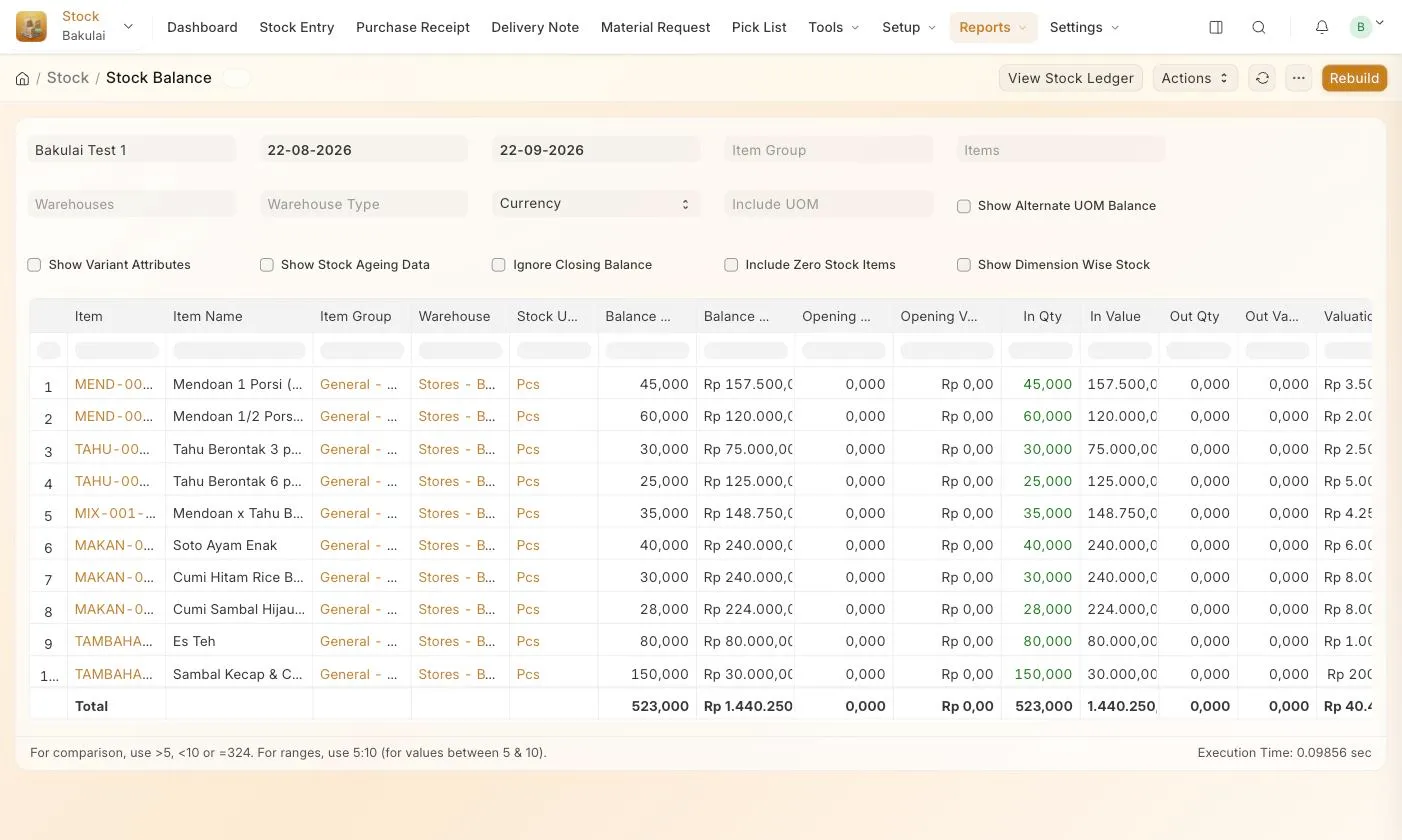
Section titled “Check what is left”- Stock → Reports → Stock Balance — every item with quantity and value. It runs in the background: set the dates, press Generate New Report, then reload the page to see the result.
- Or ask: “how many boxes of gauze are left?” in the assistant — faster than any filter.
Troubleshooting
Section titled “Troubleshooting”- Stock does not move when I sell — the item is non-stock (see the top of this page), or the invoice did not have Update Stock ticked.
- “Negative stock error” — you are issuing more than Bakulai knows you have. Enter the missing receipt or a stock reconciliation first; the block protects your cost of goods.
- The valuation looks wrong — an opening entry without a valuation rate. Correct it with a new stock reconciliation.