
Choose a model and key
Who this is for: an owner connecting a model provider for the first time, or switching to another one.
Bakulai Agent brings no model of its own: agents think with the AI subscription or API key you connect. One setting on your own desk is enough — every agent you add afterwards inherits it.
This part is done by you at the desktop app: QR codes, keys, tokens and deletions never pass through an agent or the tablet. An agent can only open the screen for you.
-
Click your own desk (Bakulai, in the Owner’s Office) → Settings in the panel header → the Model tab.
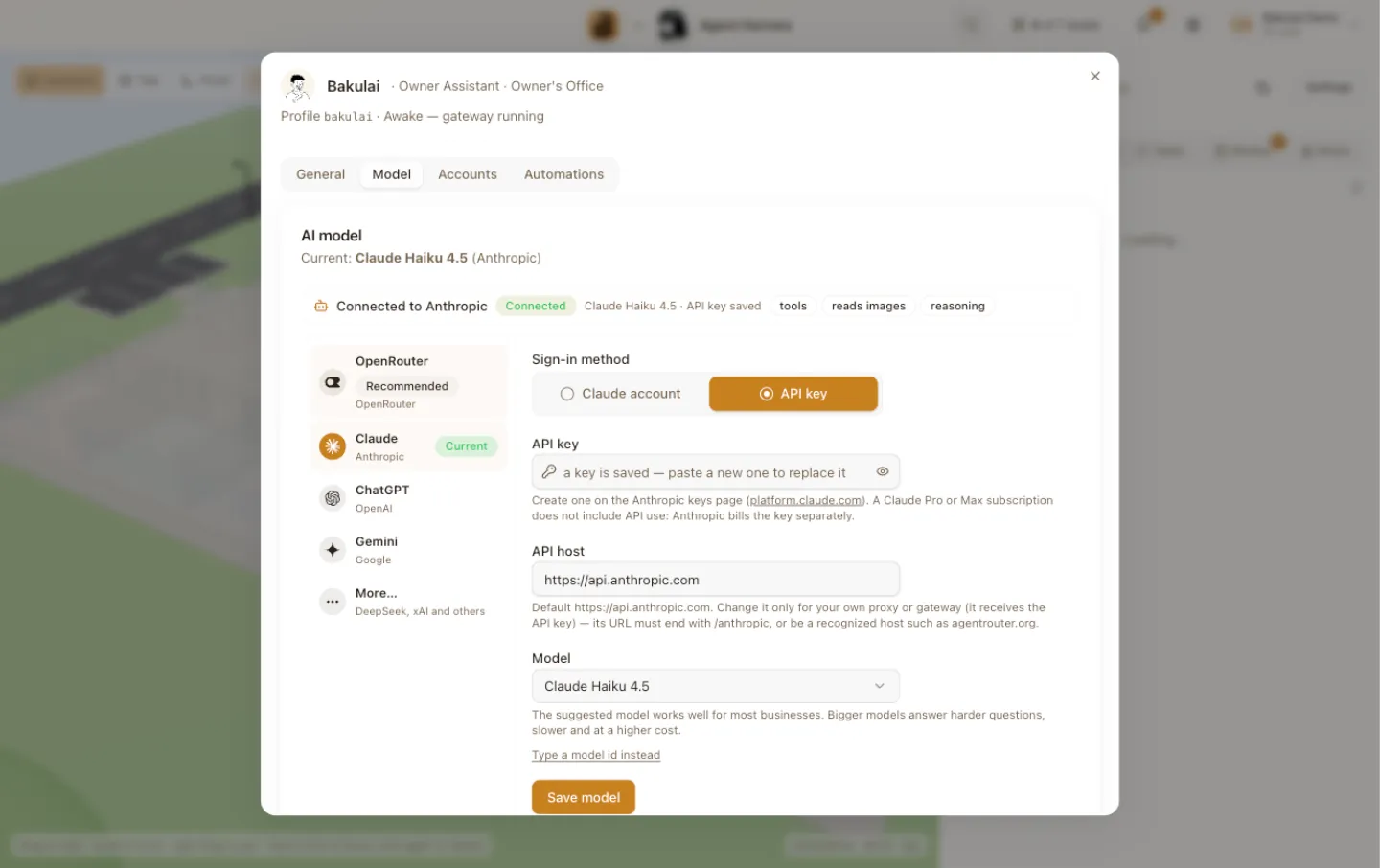
The owner desk dialog, Model tab -
Pick a provider from the menu on the left — the setup opens on the right. The four on the list are the common ones; More… at the end opens DeepSeek, xAI, MiniMax, Nous and any other provider Hermes lists. Pasting an API key also picks the provider for you — the key’s shape tells Bakulai which provider it belongs to.
Provider Sign-in method Where the key comes from OpenRouter API key openrouter.ai/keys — one key for 300+ models, the simplest start Anthropic Claude account or API key Claude Pro/Max subscription, or console.anthropic.com OpenAI ChatGPT account or API key ChatGPT Plus/Pro or Codex subscription, or platform.openai.com Google Gemini API key aistudio.google.com DeepSeek (More…) API key platform.deepseek.com xAI (More…) xAI account or API key SuperGrok / X Premium+, or console.x.ai MiniMax (More…) MiniMax account or API key platform.minimax.io Nous (More…) Nous account portal.nousresearch.com Other (More…) API key any provider Hermes lists -
Choose the Sign-in method. Account opens your browser (or shows a code to type on the provider’s page) and signs in with the subscription you already pay for. API key takes a pasted key.
-
Pick the Model. The list opens with the Recommended model — it works well for most businesses; bigger models answer harder questions, slower and at a higher cost. Type a model id instead lets you enter one by hand. The card on top shows what is connected now and what the model can do (tools, images, reasoning). Press Save model.
-
Optional, under Advanced: Reasoning sets how hard the model thinks before answering, and Show the thought process lets this agent’s chat in the app display how it thinks. Both apply from the agent’s next session, and chats with customers stay clean either way.
Ask your agent
Section titled “Ask your agent”Things you can say to an agent in Bakulai Agent:
“which model are my agents using?”“how do I connect my Claude account?”No tool for this page yet — an agent can explain the steps and open the screen for you.
Limits & safety
Section titled “Limits & safety”- Keys and account tokens stay in the app’s data folder on this computer, in the profile of each agent. They never travel to Bakulai’s servers, to a tablet or through any agent.
- A Claude subscription used outside the Claude apps needs extra usage credits on the Anthropic account; without them the agent answers with a credit error. See Costs.
- One provider at a time per agent; the owner’s choice is the default for everyone, and each agent’s own Model tab can override it.
Troubleshooting
Section titled “Troubleshooting”- “No model yet” on an agent’s desk — the owner’s desk has no provider saved; set it there first, then press Retry setup on the agent.
- Account sign-in never finishes — the browser window was closed before the provider redirected back; press Sign in again.
- The model answers with a quota or credit error — the subscription or key ran out of credit; top up at the provider, no change needed in the app.